- Follow us on Discord for the most frequent updates to new features and bug fixes.
- What's new? Read our Change Log.
Latest News
-
 Family Trees: Map the Bloodlines of Your World
October 21, 2026 -
 More Than Campaigns: Using Chronica for Novels and Worldbuilding
October 15, 2026 -
Introducing Resources: Track Everything Your Campaign Values
June 03, 2026 -
 Why Chronica's Custom Calendars and Developments Feature is a Game-Changer for RPG Campaigns
October 31, 2024 - No need to time travel, view our news archive.
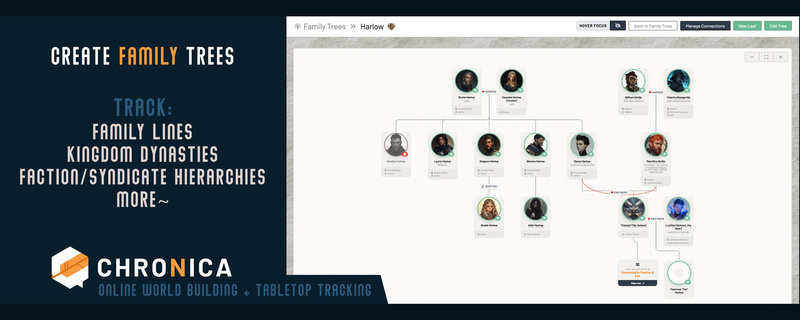
Royal lines, rival houses, and secret heirs are great stories, but they are hard to keep track of. Family Trees let you draw them from the characters you already have, and keep the secrets hidden until you are ready.
Every good world has families with history. A royal line with a missing heir, two noble houses joined by a marriage that nobody wanted, a blacksmith who does not know who his real father is. These stories are a lot of fun at the table, but they are hard to keep track of in your notes.
Family Trees give you a place to track them. You build the tree from the characters you already have (or add unconnected cards for characters not in your codex), and Chronica arranges it for you.
Where to find it
Open the NPC Codex in one of your campaigns and click the Family Trees button at the top of the page. From there you can create a tree, sort trees into folders, and search them.
Build from your Codex
Each person on a tree is a card. When you add a card, pick a character from your Codex or enter in custom details. The card uses that character's name, title, status, and image, so you do not have to enter anything twice.
Not everyone needs a full profile! Sometimes you want characters in your tree that aren't important enough to add to your codex. You can also add a card without connecting it to a character and give it all the same details: name, title, race, image, status, etc.
If you are connecting characters from your codex, it will automatically pull the details for you, but you still have the option to overwrite them. This is handy for things like families where that character might go by a different name or you want different titles to display. You can change those details on the tree card itself without changing their Codex profile.
You can also choose to show faction, race, or class on every card in a tree. This is useful for trees where those details matter, like a family where half the children took after an elven mother.
Connect the family
There are two kinds of connections: parents and partners. Add them, and Chronica places each generation in its own row.
Real families are messy, and the trees can show that:
- Add a note to a partnership, like married, engaged, widowed, or divorced. A broken partnership shows a broken heart.
- Add a note to a child, like adopted, step, foster, or ward.
- Choose solid, dashed, or dotted lines, and pick a color for each line. For example, use a dotted line for a rumored parent.
Link trees together
Large families can get crowded. You can add a link card that points to another tree, so the family continues there. For example, connect a link card to a bride from a rival house, and it leads to her own family's tree. Click the link card to go from one house to the next.
Secret heirs stay secret
As the Game Master, you can mark a whole tree or a single card as secret. When a card is secret, players also cannot see that person's children, grandchildren, or the partners on that hidden line. So a hidden heir stays hidden, and so does their whole branch, until you are ready to reveal it.
Search is safe too. When players search for a person, they only find the people they are allowed to see.
You see the full tree. Hidden cards are marked so you can see what your players cannot.
Easier to read
Turn on Hover Focus at the top of a tree if your family is getting large and you need to more easily see direct relatives. When you move your mouse over a card, it highlights that person's closest family and fades the rest. This setting is only for you, so each player can choose what they like.
Each character's profile also lists every tree they appear on, so you can go from the person to their family in one click.
Let your players help
Players can view your family trees. If you want a player to help build them, give them the Family Tree Manager role on the Players page. This works well for the player who always asks about their character's long-lost cousin.
Ideas to get you started
- A royal family, with the true heir marked as secret.
- A player character's family, built together with that player.
- The leaders of a thieves' guild or a holy order, drawn as a "family" of mentors and students.
- The gods of your world and their many children.
We would love to see what you build. Come share your trees, or tell us what you would like to see next, on our Discord server. We also post our newest updates there first.
Happy adventuring! :)