
Opening an encounter ("Enter Encounter") takes you to its three screens.
Battle Screen
The battle screen is your initiative tracker. The Initiative List splits combatants into In Combat and Out of Combat, and the left side holds editable Notes and an Events / Triggers / Traps panel. Use the green "+ Entity or Character" button to add combatants, the color tracks to mark status, and the "Mini Guide" button for an in-screen refresher.
Entities & Characters Screen
This screen manages who's in the encounter. Add foes from your Entities or characters from the Codex with "Add Entity or Character", edit each combatant's card, view notes, or clone an entity to add several of the same foe quickly.
Loot Screen
Each encounter has its own loot inventory. Use "Add Item" and "New Container" to stock it, then transfer the spoils to players or the party when the fight is won — it works like any other inventory (see Items & Inventory).
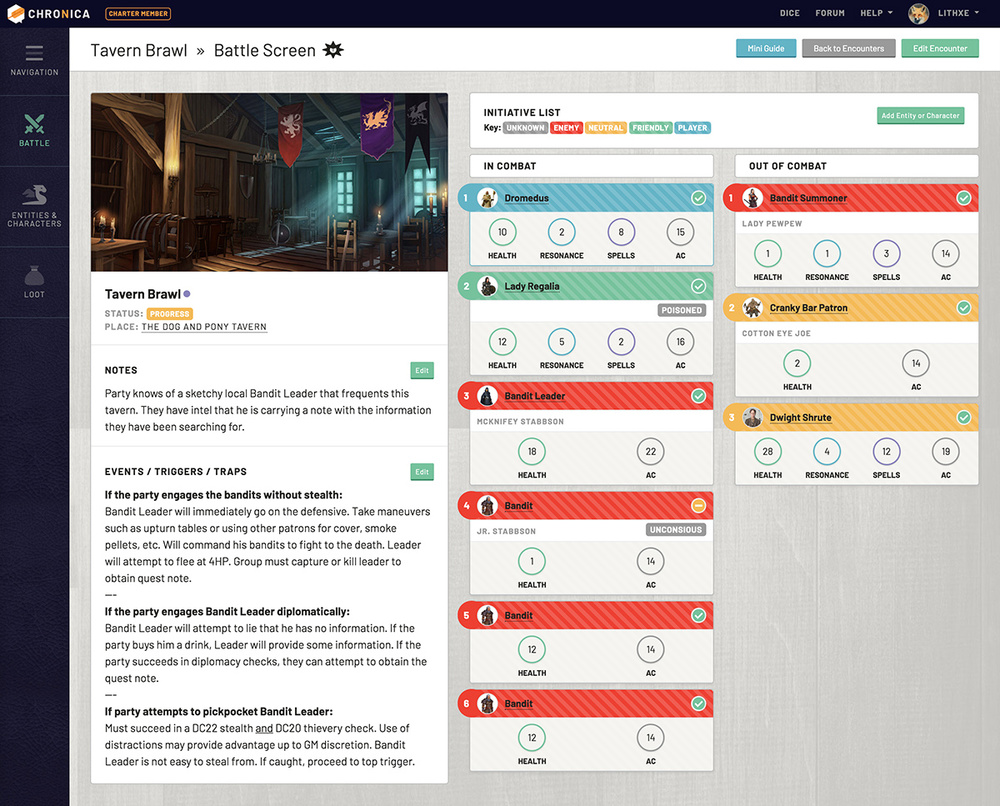 Chronica Encounters tracking: Battle Screen